


Compare paper documents and digital backups, learn which household records to keep, and build a practical document protection system with secure digital storage and a fireproof document bag.
Important household documents are easier to manage when you have a reliable system for storing, accessing, and backing them up. Digital copies make information convenient to retrieve and share, while paper documents remain useful when original signatures, physical records, or printed copies are needed. So, should you choose paper documents or digital backups? For most households, the better solution is to use both.
A well-organized document system doesn't need to be complicated. By deciding which records to keep physically, which to digitize, and how to protect each copy, you can make everyday paperwork easier to manage without relying on a single storage method.
1. Why Digital Backups Are Useful for Household Documents
Digital backups have changed the way families organize important information. Instead of searching through drawers or filing cabinets, you can often find a scanned document on your phone or computer in seconds.
Here are some of the main advantages.
Easy Access and Sharing
Digital copies are convenient when you need to send paperwork to an insurance provider, contact a school, complete an application, or share information with an authorized family member.
For example, keeping a digital copy of your home insurance policy can make it easier to find your policy number and contact details without searching through a stack of papers.
Less Physical Clutter
Households accumulate paperwork over time. Digitizing records that don't need to be retained in their original physical form can reduce clutter and make filing cabinets easier to manage.
You can organize digital files into clearly labeled folders, such as:
-
Identity and personal records
-
Home ownership and property documents
-
Insurance policies
-
Financial and tax records
-
Medical and family information
-
Warranties, receipts, and purchase records
Use descriptive filenames and dates so you can identify the correct version quickly.
Multiple Backup Options
Digital documents can be stored on a computer, an external drive, or a reputable cloud storage service. Maintaining more than one copy helps reduce dependence on a single device.
However, digital storage still requires maintenance. Devices can fail, accounts can become inaccessible, and files may be accidentally deleted. Use strong passwords, enable multifactor authentication where available, and periodically verify that your backups can actually be opened.
2. Why Paper Documents Still Matter
Digital storage is convenient, but it doesn't eliminate the need for physical documents.
Some records must be presented in their original form, depending on the document and the relevant institution's requirements. Other paperwork is simply easier to review or use when you have a printed copy available.
Some Documents May Need Their Original Form
Certain legal, financial, or property-related documents may require an original, a certified copy, or another officially accepted version.
Examples can include:
-
Wills and estate planning documents
-
Property deeds and certain signed agreements
-
Birth, marriage, or other official certificates
-
Vehicle ownership documents
-
Signed legal or financial paperwork
Requirements vary by document and jurisdiction, so don't assume that a scan can replace the original. Check with the relevant authority or professional before discarding physical records.
Paper Copies Provide an Alternative Way to Access Information
A printed document doesn't depend on a charged phone, a working computer, an internet connection, or access to a cloud account.
This can be useful during travel, administrative appointments, or situations where you need to review information away from your usual devices.
Paper copies are not automatically safer, though. They can be misplaced, damaged by moisture, or exposed to heat and fire. They still need an appropriate storage location.
3. Paper Documents vs. Digital Backups: Which Is Better?
Neither method is ideal for every situation. The best choice depends on what you're storing and how you may need to use it.
|
Factor |
Paper documents |
Digital backups |
|---|---|---|
|
Everyday access |
Easy when stored nearby |
Convenient across compatible devices |
|
Sharing information |
May require scanning or mailing |
Often quick to share securely |
|
Original signatures |
Can preserve the signed original |
A scan may not replace the original |
|
Physical space |
Requires filing or storage space |
Requires digital storage capacity |
|
Main risks |
Fire, water, loss, and physical damage |
Device failure, account loss, and cyber threats |
|
Maintenance |
Periodic sorting and condition checks |
Backup verification and security updates |
|
Best use |
Originals and records requiring physical retention |
Reference copies and convenient access |
The important distinction is that a digital backup is not always a substitute for an original document. Similarly, storing a paper original in a drawer does not provide the convenience or redundancy of a well-maintained digital copy.
Using both methods allows you to benefit from their different strengths.
4. How to Build a Practical Paper-and-Digital Document System
You don't need to digitize every sheet of paper in your home. Start with the documents that matter most and build a manageable routine.
Step 1: Identify the Documents Worth Protecting
Gather your important household records and sort them into categories. Separate documents that must be retained in their original form from those you only need for reference.
Pay particular attention to records that would be difficult or time-consuming to replace.
Step 2: Create Digital Copies of Important Records
Scan or photograph suitable documents in good lighting. Make sure names, dates, signatures, and other essential details are readable.
Save the files in clearly labeled folders. For sensitive information, use secure storage and restrict access to people who genuinely need it.
Step 3: Keep More Than One Digital Copy
Avoid relying entirely on one phone, laptop, or external drive.
For example, you might keep an encrypted copy on an external drive and another secure copy in cloud storage. Periodically check that both copies are accessible and up to date.
Remember that syncing files across devices is not always the same as maintaining an independent backup.
Step 4: Choose a Dedicated Place for Physical Records
Once you've identified which documents need to remain on paper, give them a consistent home.
Use folders or labeled sleeves to separate legal records, insurance paperwork, property documents, and other essential information. Keep frequently used papers easy to access while storing sensitive originals securely.
This is also where a dedicated protective storage solution can help.
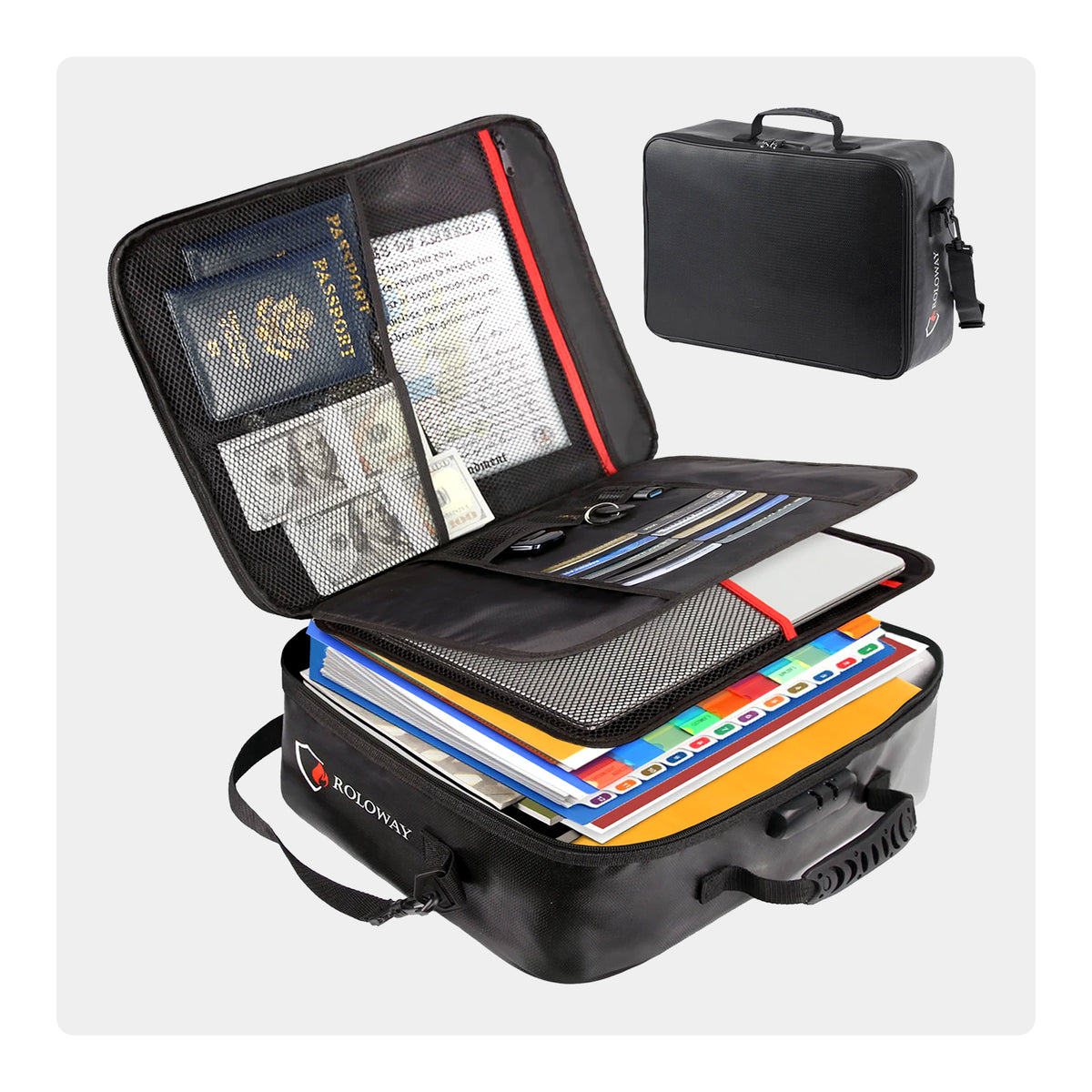
Suggested middle-of-article product image: RoloWay fireproof document bag in a home office setting.
A RoloWay fireproof document bag can provide a dedicated place to organize paper records that you want to keep together. Depending on the model, compartments and card slots can help separate smaller documents and frequently referenced items from larger papers.
Rather than scattering essential paperwork across several drawers, you can create one clearly designated storage location for the physical records that matter most.
When choosing a fire-resistant bag, review its construction, closure design, capacity, and care instructions. Fire-resistant products offer an additional layer of protection, but performance depends on the product and the conditions involved. No bag should be treated as a guarantee that its contents will survive every fire.
Step 5: Review Your System Regularly
Documents change as your household changes. Insurance policies are renewed, addresses change, vehicles are replaced, and family records are updated.
Set a recurring reminder to review your physical and digital files. Replace outdated reference copies, verify your backups, and confirm that important originals are still stored where expected.
A short review every few months can help prevent a disorganized pile of paperwork from building up again.
5. Common Document Backup Mistakes to Avoid
Even a simple system can become unreliable if you overlook a few important details.
Keeping every copy in one place. If your paper originals and all digital copies are stored together, one incident could affect every version. Consider keeping a secure digital backup separate from your physical records.
Assuming every scan replaces the original. Some documents have specific retention or presentation requirements. Check before disposing of originals.
Saving files without organizing them. A folder full of files named “Scan001” and “Document2” is difficult to search. Use consistent filenames and categories.
Forgetting about digital security. Backups may contain sensitive personal and financial information. Protect accounts and devices, and avoid sharing unrestricted folders unnecessarily.
Never checking whether backups work. A backup is only useful if the files can be retrieved when needed. Open a few files periodically and confirm that your storage method is functioning.
Using protective storage without considering its limitations. Fire-resistant bags can help protect paper records, but they do not eliminate every risk. Follow the manufacturer's guidance and consider other threats, including water, theft, and unauthorized access.
6. Which Documents Should You Keep in Paper Form and Digitally?
Use the following checklist as a starting point. Your actual retention needs will depend on your household, location, and the requirements for each document.
|
Document type |
Keep a physical copy? |
Keep a digital copy? |
|---|---|---|
|
Birth and marriage certificates |
Retain originals as appropriate |
Yes, for reference |
|
Home deed and ownership records |
Retain required originals |
Yes |
|
Insurance policies |
Keep required paperwork |
Yes |
|
Tax records |
Follow applicable retention rules |
Yes, where permitted |
|
Wills and estate documents |
Follow legal and professional guidance |
Secure reference copy, if appropriate |
|
Appliance receipts and warranties |
Keep when useful or required |
Yes |
|
Medical and emergency contacts |
Keep essential information accessible |
Yes, securely |
|
Identification documents |
Follow official guidance for originals |
Secure reference copy, where appropriate |
For sensitive documents, avoid storing unprotected scans in shared folders or on devices that other people can access. Also remember that digital copies may contain the same sensitive information as the originals, so they deserve equally careful handling.
Final Thoughts: Use Both Methods to Protect What Matters
Paper documents and digital backups serve different purposes. Digital files make household information easier to search, access, and share, while physical documents remain important when originals or printed records are required.
A practical system combines both: digitize important records, maintain independent backups, store essential paper documents in a dedicated location, and review everything periodically.
If you're organizing your household paperwork, a RoloWay fireproof document bag can be one part of that system by keeping selected physical records together in a purpose-designed storage solution. Pair it with secure digital backups and sensible document management habits to build a more organized approach to protecting your family's important information.